

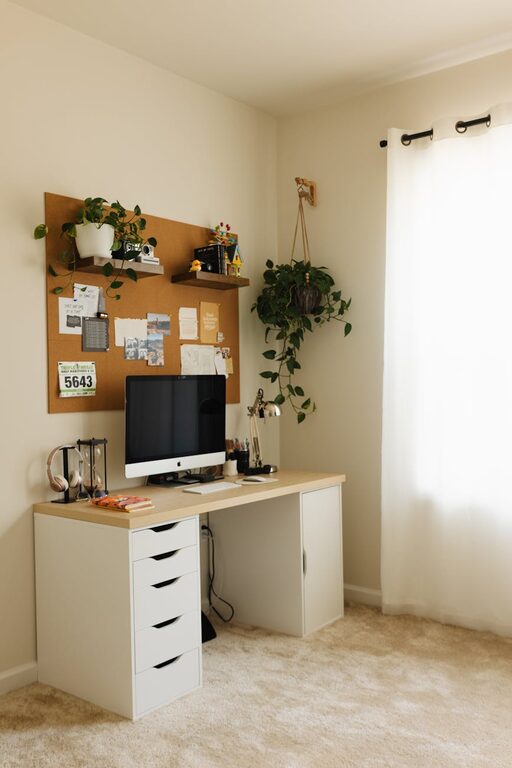
Creating a cozy and functional home workspace is essential for anyone working remotely or managing tasks from home. A well-designed workspace not only boosts productivity but also makes the workday more pleasant and less stressful. Whether you have a dedicated room or just a small corner, you can transform your space into a comfortable and efficient area. In this post, we’ll explore practical tips to help you achieve the perfect balance between comfort and functionality.
Choose the Right Location
Assess Your Space
Start by finding a spot in your home that can serve as your workspace. Ideally, this should be a quiet area with minimal distractions. If a separate room is not available, look for a corner or nook that can be dedicated to work.
Consider Natural Light
Natural light improves mood and focus, so try to position your workspace near a window. If natural light is limited, invest in good-quality artificial lighting that mimics daylight to reduce eye strain.
Invest in Comfortable and Supportive Furniture
Ergonomic Chair
A comfortable, ergonomic chair is one of the most important items in your workspace. Look for chairs that support your lower back and encourage good posture, especially if you plan to spend long hours sitting.
Appropriate Desk
Choose a desk that fits your needs and space. It should be large enough for your computer, documents, and any other essentials without feeling cluttered. Adjustable desks that allow you to switch between sitting and standing positions can also be beneficial.
Organize for Efficiency
Declutter Regularly
Keep your workspace tidy to reduce distractions and boost productivity. At the end of each day, take a few minutes to put things back in place.
Use Storage Solutions
Incorporate shelves, drawers, or desk organizers to keep your tools and supplies accessible but out of sight. This helps maintain a clean and inviting environment.
Personalize Without Overcrowding
Add Personal Touches
Incorporate a few personal items like photos, plants, or artwork that make the space welcoming. However, avoid overcrowding your workspace with too many objects which can become distracting.
Use Calming Colors
Colors can influence mood and productivity. Soft, neutral tones or calming blues and greens tend to create a relaxing atmosphere conducive to focus.
Enhance Comfort and Functionality
Control Temperature
Make sure your workspace is in a comfortable temperature zone. Use fans, heaters, or adjustable windows as needed to maintain a pleasant environment.
Manage Noise Levels
If noise is an issue, consider noise-canceling headphones or white noise machines to help maintain concentration.
Optimize Technology Setup
Ensure your computer, monitor, keyboard, and other devices are set up ergonomically. Position your screen at eye level and keep the keyboard and mouse within easy reach to avoid strain.
Establish Boundaries and Routine
Set Work Hours
Define clear working hours to help separate professional and personal time. This helps you stay focused while working and allows for better relaxation afterward.
Communicate Your Space’s Purpose
If you share your home with others, let them know when you’re working so you can minimize interruptions.
Add Inspiration and Break Areas
Create a Vision Board
Having a visual reminder of your goals and inspirations can motivate you throughout the day.
Plan Short Breaks
Set up a comfortable area nearby for short breaks. Even a cozy chair or a spot with natural light can help you recharge quickly.
—
By thoughtfully designing your home workspace, you can create an environment that feels inviting and meets your professional needs. Remember, the goal is to build a space that supports focus and productivity while still being comfortable and calming. Start small, and adjust your setup over time as you discover what works best for you. Happy working!